AI-Powered Media Server
Management
Control your entire media library with natural language. A polished Desktop App with a built-in setup wizard, dashboard, and AI chat — or a one-command CLI for headless servers. Both drive the same stack of 30 MCP tools.
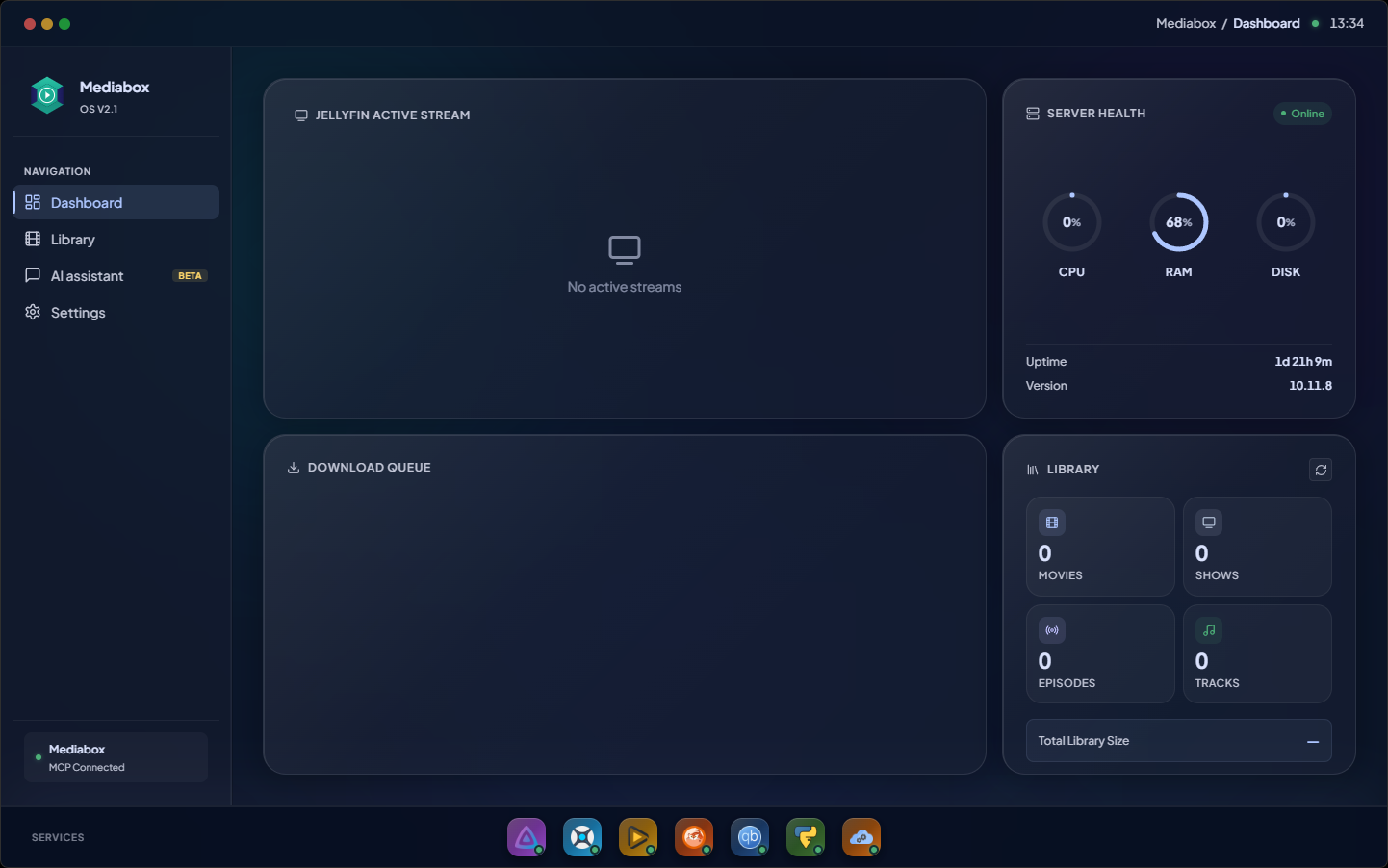
Your entire media stack, one app
Mediabox OS deploys, monitors and lets you drive Jellyfin, Sonarr, Radarr, Prowlarr, qBittorrent, PyLoad and FlareSolverr — without ever opening five web UIs. The MCP server runs as a bundled sidecar, so there is nothing extra to install.
Nine services, one live view
Now-playing pulled from Jellyfin, server health, downloads merged from qBittorrent and PyLoad, library counts straight from your *arr stack — all rolled up on a single dashboard. Nothing here is a mockup; it talks to the real services.
Click any thumbnail to switch · click the main image to expand
Download Mediabox OS
Native Desktop App with a built-in setup wizard, dashboard, AI chat, and live container logs. Bundles the MCP server as a sidecar — no extra install needed.
Windows
x64 · MSI installer
Works on Windows 10 / 11 (64-bit). Use the .msi for unattended installs or the .exe (NSIS) for a guided installer.
macOS
Universal · Apple Silicon + Intel
One .dmg that runs natively on M-series and Intel Macs. Drag the app to Applications.
Linux · Debian/Ubuntu
amd64 · .deb
Install with `sudo dpkg -i Mediabox.OS_*.deb`. AppImage support is on the roadmap.
Beta builds are unsigned. Windows SmartScreen and macOS Gatekeeper will warn on first launch — open via right-click → Open on macOS, or "More info → Run anyway" on Windows.
Everything you need
A complete self-hosted media stack, orchestrated by AI
Docker Stack
Jellyfin, Sonarr, Radarr, qBittorrent, Prowlarr, PyLoad, FlareSolverr, and more — all orchestrated with Docker Compose.
30 AI Tools
Search, download, organize, and maintain your media library entirely through natural language conversations.
One-Command Setup
Run npx create-mediabox and the interactive wizard handles everything: config, Docker, and service auto-configuration.
Telegram Bot
Manage your server from anywhere with the optional Telegram integration powered by LLM providers.
3 Deploy Modes
Local network, VPS with Caddy reverse proxy and auto-HTTPS, or Cloudflare Tunnel for home servers behind NAT.
Protected Access
OAuth-protected MCP access, server-issued confirmation tokens, path and URL sandboxing, browser origin allowlisting, and Docker network isolation.
Architecture
A unified AI layer connecting all your media services
Powerful Tools
30 tools across 6 categories to manage every aspect of your media server
server_statusServer info, disk usage, library stats, active sessions
activity_logRecent activity: who watched what, logins, library changes
search_mediaSearch or list content with pagination and type filtering
show_detailsTV show details with seasons and episodes breakdown
Deploy Anywhere
Choose the deployment mode that fits your setup
Local
Direct port access on your home network. Simplest setup for personal use.
8096, 8989, 7878... VPS + Caddy
Automatic HTTPS with Let's Encrypt. Each service gets its own subdomain.
jellyfin.domain.com Cloudflare Tunnel
No port forwarding needed. Secure access through Cloudflare's network.
Cloudflare Network Up and Running in 3 Steps
From zero to a fully configured media server in minutes
Run the installer
One command bootstraps everything
npx create-mediaboxAnswer the wizard
Choose deployment mode, set media paths, credentials for qBittorrent and Jellyfin, and optionally enable Telegram bot with your LLM API key
Connect your AI
Add the MCP server to Claude Desktop or any MCP client
{
  "mcpServers": {
    "mediabox": {
      "url": "https://your-domain.com/mcp"
    }
  }
}Ready to automate your media server?
Join the open-source community building the future of AI-powered media management.